Introducing AI Explain: Understand Server Errors in Seconds
Troubleshooting server issues can be challenging, especially when you're faced with technical error messages and event logs that aren't always easy to interpret. Whether you're an experienced system administrator or managing infrastructure for the first time, understanding what went wrong is often the biggest hurdle.
That's why we've introduced AI Explain, a new feature built directly into our control panel's Event Log.
AI Explain helps transform complex system events into clear, human-readable explanations. Instead of spending time searching through documentation, forums, or support articles, you can now get an instant explanation of what happened, why it likely happened, and what steps you can take to resolve the issue.
How It Works
Whenever an error, warning, or important event appears in the Event Log, click on it and you'll see the option to use AI Explain.
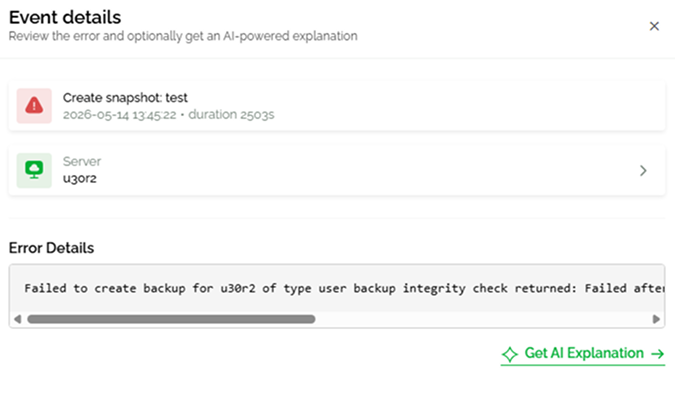
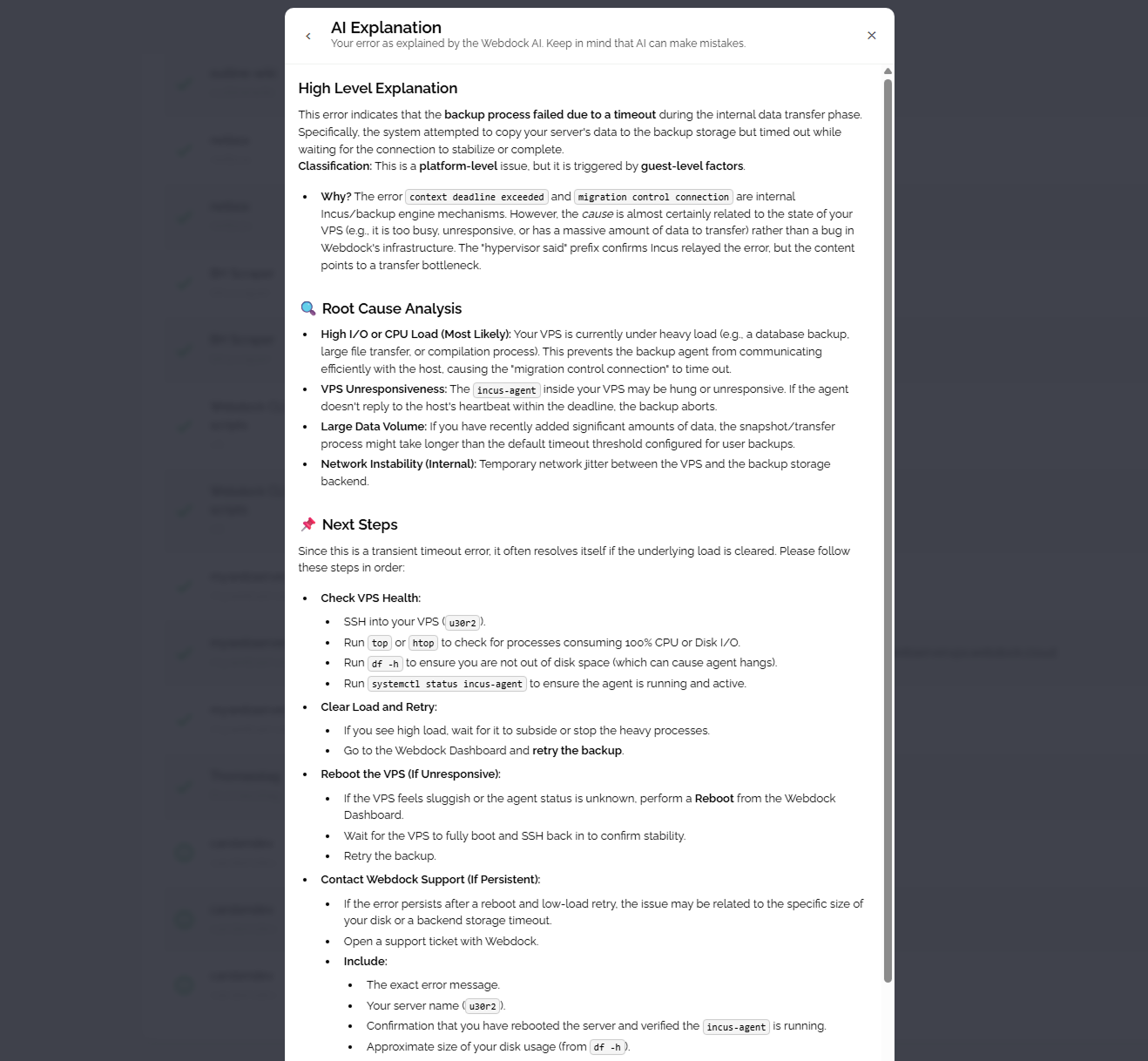
With a single click, our AI analyzes the event and provides a structured explanation that focuses on three key areas:
What Happened?
AI Explain translates technical log entries into plain language, helping you understand what the server, application, or service was attempting to do when the issue occurred.
What Is the Likely Cause?
The feature identifies the most probable root causes behind the event. This could include configuration problems, resource limitations, network issues, permission errors, application failures, or other common infrastructure-related problems.
How Can It Be Resolved?
AI Explain also provides practical suggestions and troubleshooting steps that may help you address the issue. Instead of simply reporting that something failed, it offers guidance on where to begin investigating and what actions may be worth taking next.
Built for Every Experience Level
One of the biggest challenges with server management is that not everyone has the same technical background. AI Explain is designed to help both beginners and experienced users.
For newer users, it provides valuable context and makes server events easier to understand. For experienced administrators, it can serve as a quick first-pass analysis tool that helps speed up troubleshooting and reduce time spent researching unfamiliar errors.
Faster Troubleshooting
When problems occur, time matters. Website outages, failed deployments, service interruptions, and application errors can all impact your projects and customers.
By providing immediate explanations directly inside the control panel, AI Explain helps shorten the time between discovering a problem and understanding it. Instead of starting with a cryptic error message, you begin with actionable information that helps guide your next steps.
Available Now
AI Explain is now available directly from the Event Log in our control panel. The next time an error or warning appears, simply click AI Explain to get an instant breakdown of the issue, its likely cause, and possible solutions.
Because solving problems starts with understanding them.
/
Made with love by your Webdock team 💚