🔬 Behind the Scenes: How We Built Webdock’s New AI Chat From the Ground Up
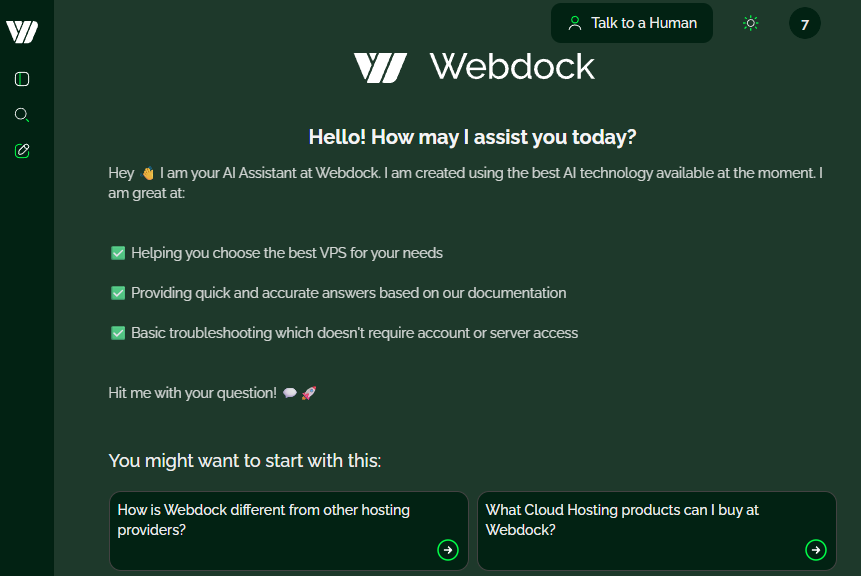
We recently launched our new in-house AI chat system, and while our newsletter announcement focuses on the user-facing experience, this post goes all-in on the technical foundation. If you're curious about how a small team can design a fast, sustainable, and highly reliable RAG-powered AI assistant with full control, this is your deep dive.
Want to check it out? Try it here
Let’s start from the top and walk through the entire pipeline.
1. Architectural Overview
Our AI system is built as a modular, multi-stage pipeline optimized for speed, determinism, and Webdock-specific accuracy.
The flow looks like this:

This architecture gives us:
predictable latency
extremely high context relevance
minimal hallucination rate
full transparency and debuggability
We’re not relying on a monolithic LLM to “figure everything out.” Instead, every stage has a clear responsibility and failure domain.
2. Step 1 — Query Normalization with Mistral-Nemo
Most RAG pipelines skip this step. We do not.
Users write messy things. They ramble. They include multiple questions in one sentence. They mix languages in the same sentence. They mention emotional context, or reference “that thing earlier” without clarity.
Before we do anything, the user message is fed into a lightweight Mistral-Nemo model running locally. Its job:
Clarify ambiguous phrasings
Remove filler words
Convert casual speech into structured intent
Extract the core problem statement
Produce a version of the question optimized for vector search
Translate the query to english with high accuracy, even if mixed languages are used
This is not rewriting for the LLM — it is rewriting specifically to improve retrieval accuracy while normalizing the query to english.
Typical example:
User:
“Hey, so I rebooted and now MariaDB doesn't start and the VPS seems weird??”
Normalized version:
“MariaDB won't start after VPS reboot”
This improves retrieval precision dramatically, especially across large or similarly-worded documents.
Latency for this step: ~400 ms.

3. Step 2 — High-Performance Vector Search (bge-m3 + Markdown Knowledge Graph)
We chose bge-m3 after benchmarking several embedding models for:
semantic quality
multilingual capability
robustness to noise
cosine similarity distribution consistency
performance on small hardware
It consistently produced the best retrieval results for Webdock’s knowledge domain.
Our Knowledge Graph: Markdown Everywhere
Every piece of Webdock documentation — website pages, KB articles, product pages, FAQ entries, migration guides, pricing descriptions, API docs — is continuously transformed into clean, structured Markdown objects.
Each Markdown block is summarized into:
A short “semantic header”
A long-form chunk
Metadata tags
Canonical source URL
Timestamped summary
This gives us a search index that always matches reality, even when we update the docs.
Knowledge Base → Markdown → Summaries → Embeddings → FAISS Index
----------------------------------------------------------------
[Docs] --> [Markdown] --> [Chunking] --> [Summaries] --> [bge-m3 Embedding]
         |              |                |                |
         |              |                |                +--> [Vector Store]
         |              |                |
         |              |                +-----------------------> [Metadata Index]
         |              |
         +----------------------------------> [Continuous Updater (Cronjob)]
Embedding & Search
Emb → embed with bge-m3 (1024-dim vectors)
cosine similarity search using an optimized FAISS pipeline
approximate kNN tuned for sub-millisecond distance calculations
Retrieval time: ~300 ms for the entire operation, including:
embedding
vector search
top-k filtering
deduplication
relevance weighting
chunk aggregation
This is extremely fast for a full RAG pipeline.
4. Step 3 — Context Assembly + 3-Turn Memory
Once the relevant chunks are found, we build the payload for the LLM.
Included in the final context:
our engineered system prompt
the normalized query
the top relevant Markdown chunks
the user’s last 3 messages
the LLM’s most recent answer
We call this our micro-conversation memory.
It avoids long-context bloat while still supporting:
conversations about troubleshooting
multi-turn clarification
follow-up questions
refinement loops
We do not store or log this memory beyond the active session — it is purely local context.
Context assembly time: ~20–40 ms.
Context Assembly Payload Composition
System Prompt                  | ████████████████████ 35%
RAG Chunks                     | ███████████████████████████ 45%
User Message History (3 turns) | ████████ 15%
Assistant Last Reply           | ██ 5%
5. Step 4 — Response Generation Using Two Qwen 14B Instances
We run two independent Qwen 14B models via Ollama on GPUs. Why two?
improved throughput
better concurrency
more predictable latency
simple load balancing
Each Qwen instance is pinned to:
40 dedicated CPU cores (for tokenization + inference scheduling)
two A100 GPU tiles
With two independent pipelines, even if one instance receives a heavy prompt, the other keeps the system responsive.
Why Qwen 14B?
After extensive testing against other 3B–70B models, Qwen 14B hit the sweet spot:
excellent reasoning
strong multilingual capability
robust adherence to structured prompts
low hallucination rate
outstanding performance per GPU watt
fits comfortably on 2x A100 16GB VRAM
With our optimized prompt and RAG setup:
First Token Latency: ~3 seconds (when warm, the occasional cold startup can create +8 second latency here - we are working on eliminating that)
Streaming Speed: ~35–50 tokens/sec (varies by context size)
This is more than enough for support-grade responsiveness.
Why Ollama?
stable
predictable model loading
minimal overhead
zero dependency hell
efficient VRAM usage
trivial multi-instance support
It lets us keep everything reproducible and transparent.
6. Step 5 — Load Balancing & Concurrency
We use a simple, elegant round-robin router instead of a stateful queue.
Because the two LLM instances are truly independent, this lets us:
evenly distribute workload
avoid queue pile-ups under sudden load spikes
serve 10–12 simultaneous requests with comfortable latency
- But even if we hit those limits, we built a queue system which informs the user that they are next in line to be served :)scale horizontally by simply adding more model instances
This architecture is trivially scalable.
If we want:
4 Qwen instances?
or 8?
on multiple GPU servers?
…we can do that without rearchitecting the system.

7. Sustainable Compute: Why We Chose Refurbished A100 16GB GPUs
Our entire AI system runs on refurbished enterprise hardware:
NVIDIA A100 16GB PCIe cards
older generation, extremely affordable on the refurb market
far from “obsolete” in real-world inference workloads
A100 16GB still excels at:
medium-size LLMs (14B–30B)
multimodel pipelines
fast embedding generation
high concurrency inference
Because the models are so efficient, we need only four GPUs to serve our typical load with plenty of headroom.
Environmental Benefits
Refurbished Hardware = Less e-waste
100% Green Electricity (Denmark)
Zero cloud dependence
On-prem inference → no data shipped externally, 100% GDPR compliance
Extremely low operational power draw
This gives us a uniquely eco-friendly and privacy-oriented AI architecture.
8. Frontend: A ChatGPT-Class Experience, But Integrated Deeply into Webdock
Because we control the frontend entirely, we built features that SaaS chat solutions can’t offer:

✨ Features in our custom chat UI:
Smooth ChatGPT-style streaming
Animated typing indicator
Session history and reset controls
Suggested follow-up actions generated automatically
Human support handover button inside the chat
instantly switches to real support when needed
UI theme integrated with Webdock brand
Fine-grained analytics without compromising privacy
The entire frontend is loaded via a lightweight iframe overlay, allowing us to embed it anywhere on webdock.io or the control panel.
9. Prompt Engineering: The Backbone of Accuracy
Our system prompt enforces:
strict product scope
RAG-only factual grounding
competitor exclusion rules
escalation logic
URL constraints
multilingual replies
structured, modular response blocks
safety rules & fallback behaviors
The system prompt is the “constitution” of the AI.
It ensures:
🧭 predictable behavior
🚫 zero hallucinated services
📐 clear, structured answers
🔒 no drift into topics we do not support
😊 relatable and friendly Webdock tone
The prompt was refined through hundreds of test cases, and we continuously improve it by monitoring real user interactions.

10. Observed Performance in Production
After several weeks of testing and now a few days of real traffic:
Latency stats (p95):
Query Normalization    | ██████████████████████████ 400 ms
Embedding + RAG Search | ████████████████ 300 ms
Context Assembly       | ██ 35 ms
LLM First Token (warm) | ██████████████████████████████████████████████████ 3000 ms

Tokens/Second | 35–50 tokens/sec (streaming)
Hallucination rate: Near zero, thanks to strict RAG reality rules.
Uptime & reliability:
Stable across thousands of user prompts.
GPU utilization:
~20–40% per 2x GPU when processing a typical single prompt — leaving plenty of headroom.
11. Why Build All This Instead of Using an Off-the-Shelf AI Service?
Three reasons:
1. Accuracy, Control & Lower latency
We cannot rely on a general-purpose AI model “hoping” it knows Webdock’s offerings.
We need deterministic grounding.
Our LLM is extremely fast: Latency to first token from submitting your prompt to the answer streaming back to you being around 3 seconds is amazing compared to most 3rd party services.
2. Performance & Cost
Running on refurbished hardware is dramatically cheaper than cloud LLM APIs at scale. All we pay for is our 100% green electricity, and our chat AI uses about 500 watts total on average, or about 12Kw/day. At average Denmark electricity costs, we are spending about 1.6 Euro/24 hours running our stack, where we could in theory handle something like 15-20 thousand queries per 24 hours - not that our load is anywhere approaching those numbers :)
Given the typical bill from our 3rd party provider we used up until this point, which used OpenAI models, we are already saving ~80% on our monthly inference costs and have a long way to go before our costs will ever increase (given the high volume we can handle already). We are no longer paying per-token or per-conversation - instead we just have to look at overall throughput / watt and how many GPUs we have available in-house.
This calculation does not take into account depreciation cost for the hardware we sourced, but we were lucky to get our hands on a large-ish stack of Enterprise Dell 4x A100 16GB machines for very cheap, so we are not really worrying about that.
3. Privacy & Sustainability
Customer queries never leave our datacenter. 100% GDPR Compliance.
12. The Future Roadmap
We’re just getting started. What we are working on in 2026:
Conversational billing explanations
Proactive troubleshooting suggestions
Embeddings and RAG for internal support tooling
Auto-generated configuration snippets
User-specific contextual help in the dashboard
Multi-agent pipeline for pre-sales + technical assistance + lifecycle management
Our current infrastructure is flexible enough to support years of expansion, and we already have the hardware on hand to build and run most of these up-coming workloads.
In Summary
Webdock’s new AI assistant is the result of an end-to-end engineering effort involving:
model tuning
careful RAG architecture
GPU optimization
environmental sustainability
frontend development
prompt engineering
concurrency control
and deep integration into our existing documentation workflows
🌩️ It’s fast.
🎯 It’s accurate.
🌱 It’s green.
🏗️ It’s ours — built by Webdock, for Webdock customers.
Thank you for reading all the nerdy details! :)
Arni Johannesson, CEO Webdock