New Feature 🚑 Boot Your Server into SystemRescue — Directly from the Rescue Console
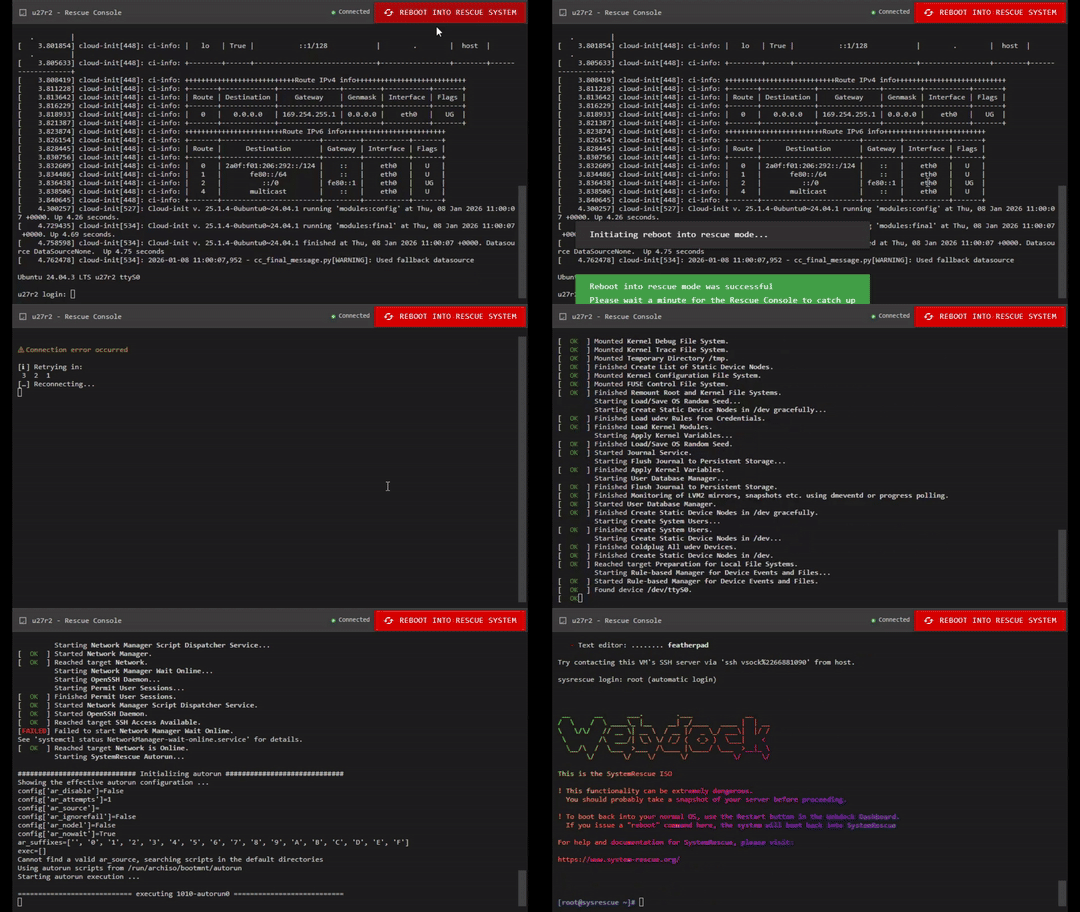
Sometimes, things break.
Filesystems get grumpy.
Bootloaders go missing.
And occasionally… you just want full, raw access to your disks without your OS getting in the way.
So we’ve just launched a brand-new feature in the Webdock Rescue Console:
👉 Reboot your VPS straight into SystemRescue — with a single click.
And yes — this feature exists because one of you asked for it just a couple of days ago. We realized it was easy to implement, genuinely useful, and honestly… a lot of fun to build. So we did. 😊
🔘 How It Works
Open the Rescue Console for your server
At the top of the screen, click “Reboot into Rescue System”
Confirm — and keep the console window open
That’s it. Your server will reboot and boot directly into the SystemRescue ISO.
It may take a minute, so please be patient while it loads.
You’ll see this message when confirming:
Reboot into Rescue System
You are about to reboot your server into SystemRescue (system-rescue.org).
Simply keep this console window open and you will see your system boot into the Rescue System ISO. This may take a minute, so please be patient.To revert to booting from your normal OS, simply use the restart button in the Webdock Dashboard.
If you issue arebootcommand inside the Rescue System, your server will simply boot back into the Rescue System.Networking should come up and be functional in SystemRescue once booted, but if you have connection issues please see the instructions in our documentation.
⚠️ Warning: Making changes to your system — especially disk partitions — is fraught with danger. You should probably create a snapshot of your server before proceeding.
🛠️ What Can You Do with SystemRescue?
SystemRescue is a powerful, battle-tested Linux rescue environment, giving you full control over your server — even if your OS won’t boot.
Here are just some of the things you can do:
💽 Disk & Filesystem Recovery
Repair broken filesystems (
fsck,btrfs-progs,xfs_repair)Mount disks manually and recover critical data
Resize or inspect partitions
Fix corrupted UUIDs or missing mounts
🧰 Boot & OS Repair
Reinstall or repair GRUB
Fix broken
/etc/fstabChroot into your installed OS for deep debugging
Recover from failed kernel upgrades
🔐 Password & Access Recovery
Reset root or user passwords
Fix broken SSH configurations
Recover access if you locked yourself out
🧪 Advanced Maintenance
Clone disks or partitions
Perform offline backups
Inspect SMART data
Zero, wipe, or securely erase disks
In short: if your OS can’t help you, SystemRescue can.
⚠️ Important Reminder
SystemRescue gives you full, unrestricted access to your disks.
This is incredibly powerful — and potentially destructive.
📸 Always create a snapshot before making changes, especially when:
Editing partitions
Repairing filesystems
Reinstalling bootloaders
🌐 Networking
Networking should come up automatically once SystemRescue has booted.
If you do experience connectivity issues, please check our docs for assistance:
👉 https://webdock.io/en/docs/webdock-control-panel/getting-started/rescue-console
🔁 Getting Back to Your Normal OS
Use the Restart button in the Webdock Dashboard to boot normally again
⚠️ If you run
rebootinside SystemRescue, your server will simply boot back into SystemRescue
💡 A Final (Friendly) Warning
SystemRescue gives you immense power — and with that comes risk.
Disk and partition changes are irreversible.
📸 We strongly recommend creating a snapshot before you begin.
As always:
You ask → we build → you break things safely 😄
Happy rescuing,
The Webdock Team 🚀